Premium isn't unlocked
Your subscription belongs to the account that was signed in when you subscribed. Most of the time, signing in to that account fixes it.
1. Sign in to the right account
Sign in the same way you did when you subscribed: Apple, Google or email. If you're not sure, see How signing in works.
2. Restore purchases
Tap the Me tab, then the gear icon in the top corner to open Settings. Under Subscription, tap Restore purchases.
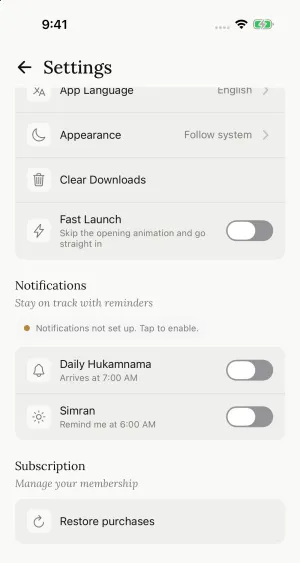
Restore checks the App Store or Google Play account on this phone. It only works if this phone uses the same Apple ID or Google account you subscribed with.
3. Link the subscription from the phone you bought it on
If you subscribed on another phone before signing in, the subscription may be tied to that phone instead of your account. See Link your subscription to your account.
Still locked?
Close Simran and open it again. Then write to simranappteam@gmail.com with your Account ID and your store receipt (the Apple receipt email, or the Google Play order number starting with GPA.). We'll attach it for you.
Still need help?
We read every message. Include the ID from the bottom of Settings in the app so we can find your account quickly.
Write to us