
Larivaar, text size and line spacing
Reader Settings also changes how the Gurmukhi looks on the page.
Open Simran, tap the Me tab, then the gear icon in the top corner to open Settings, then tap Reader Settings under Preferences.
- Larivaar shows the Gurmukhi without spaces between words, as it is written in Sri Guru Granth Sahib Ji.
- Text Size and Line Spacing are sliders. Drag them until reading feels comfortable.
- Text Alignment sets the lines to Left or Center.
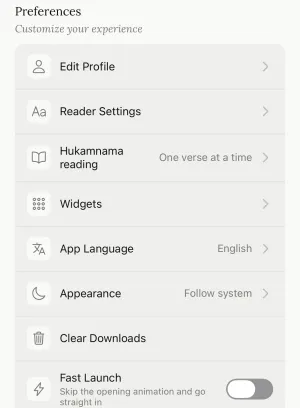
The Hukamnama reading row next to it lets you read the Hukamnama One verse at a time or All at once.
Still need help?
We read every message. Include the ID from the bottom of Settings in the app so we can find your account quickly.
Write to us